docgit
DocGit
Git-like version control for Microsoft Word documents — built as a local Office Web Add-in.
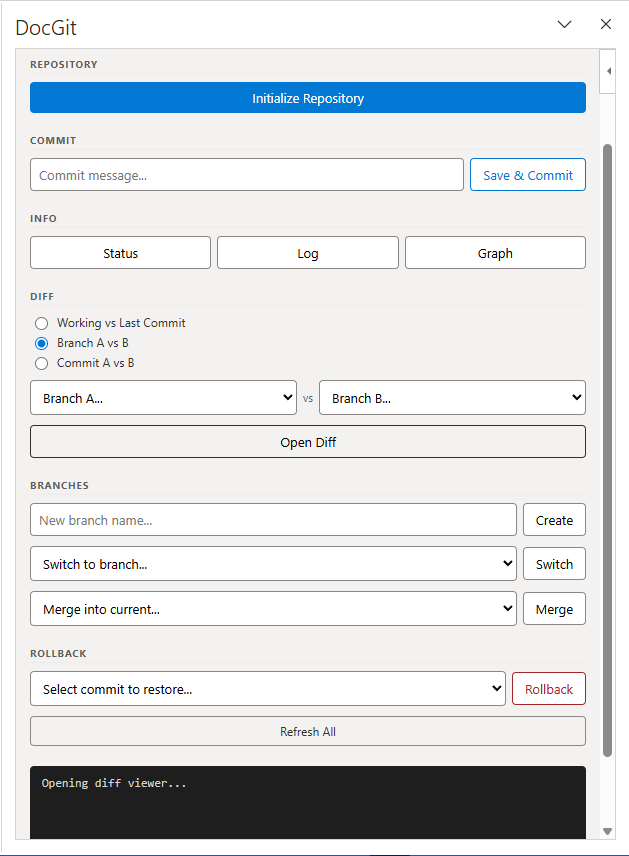
DocGit brings commit, branch, diff, rollback, and merge workflows to .docx files. It runs entirely on your local machine — no cloud, no SharePoint, no OneDrive. A task pane sidebar inside Microsoft Word gives you full version control without leaving the application.
Table of Contents
- Key Features
- Tech Stack
- How It Works
- Prerequisites
- Installation
- Getting Started
- CLI Reference
- Troubleshooting
- Contributing
- License
Key Features
| Feature | Description |
|---|---|
| Commit | Snapshot any .docx with a message; SHA-256 hashed objects stored in .docgit/objects/ |
| Branch | Create and name branches; each branch is an independent commit pointer |
| Switch | Move between branches; blocked if you have uncommitted changes |
| Diff Viewer | Side-by-side HTML comparison of paragraphs, tables, and images across any two commits or branches |
| Rollback | Two-step restore to any previous commit state |
| Merge | Combine content from another branch with conflict detection |
| Log / Graph | Full commit history and ASCII branch graph |
| Status | See which files have changed since the last commit |
| Auto-start | Server launches silently at Windows startup — add-in is always ready |
Tech Stack
| Layer | Technology |
|---|---|
| Version control engine | Python 3.10+, click, rich, python-docx |
| Local server | Python Flask + Flask-CORS, HTTPS via mkcert |
| Add-in frontend | Office.js (Word Web Add-in API), Vanilla JS, CSS |
| Packaging | PyInstaller (exe), Inno Setup 6 (installer) |
| IPC | REST JSON over https://127.0.0.1:5000 |
| Storage | Local filesystem — .docgit/ folder per document directory |
| SSL | mkcert-generated localhost certificate, installed into Windows trust store |
How It Works
Word’s task pane runs in a WebView2 (Edge) sandbox. It can only make HTTPS requests to trusted origins. DocGit solves this by running a local Flask server at https://127.0.0.1:5000 with a mkcert-generated certificate trusted by the machine.
Word Task Pane (Office.js)
        │  HTTPS JSON
        ▼
docgit_server.py  (Flask, port 5000)
        │  subprocess
        ▼
docgit.py  (CLI engine)
        │  reads/writes
        ▼
.docgit/  (index.json + objects/)
Every button click in the sidebar sends a JSON POST to the server. The server shells out to docgit.py (or docgit.exe in production), captures the output, and returns it as JSON. The sidebar displays the result in a terminal-style output panel.
Prerequisites
- Windows 10 / 11 (64-bit) — the add-in uses WebView2 and Word automation via
pywin32 - Microsoft Word 2019 or Microsoft 365
- For running from source:
- Python 3.10 or higher
mkcert— download from GitHub
Installation
Option A — Installer (Recommended)
- Download
DocGit_Setup.exefrom the Releases page - Right-click → Run as Administrator
- The installer will:
- Install
mkcertCA into Windows certificate trust store - Generate a trusted SSL certificate for
localhostand127.0.0.1 - Grant read permissions on the install folder (
C:\Program Files\DocGit) - Create a network share
\\localhost\DocGitAddinfor Word sideloading - Register the share as a trusted add-in catalog in Word’s registry
- Add
docgit_server.exeto Windows startup
- Install
- Open Microsoft Word
- Go to Insert → Add-ins → My Add-ins → Shared Folder
- Select DocGit → click Add
The sidebar will appear on the right side of Word. This step only needs to be done once — Word remembers the add-in.
If the “Shared Folder” tab does not appear in the Add-ins dialog:
The network share must be manually trusted in Word’s Trust Center:
- In Word, go to File → Options → Trust Center → Trust Center Settings
- Click Trusted Add-in Catalogs
- In the Catalog URL field, enter:
\\localhost\DocGitAddin- Click Add Catalog
- Check the Show in Menu checkbox
- Click OK and restart Word
The Shared Folder tab will now appear under Insert → My Add-ins.
First-time SSL trust: After install, open
https://127.0.0.1:5000in Edge and click Advanced → Proceed. This clears any remaining browser SSL warning.
Option B — Run from Source
# 1. Clone the repository
git clone https://github.com/CatOn60Hz/docgitt.git
cd docgitt

# 2. Create a virtual environment (recommended)
python -m venv venv
venv\Scripts\activate

# 3. Install Python dependencies
pip install -r requirements.txt
pip install flask flask-cors pywin32

# 4. Generate SSL certificate
# Download mkcert.exe from https://github.com/FiloSottile/mkcert/releases
# Place it in the project root, then:
mkcert -install
mkcert localhost 127.0.0.1
# This creates localhost+1.pem and localhost+1-key.pem

# 5. Start the server
python docgit_server.py
Then load the add-in manually in Word via Insert → Add-ins → Shared Folder (you’ll need to create the share — see Building the Installer for the net share command).
Getting Started
1. Open a document folder in Word
Open any .docx file from the folder you want to version control. All commits, branches, and history for that folder are stored in a .docgit/ subdirectory.
2. Initialize the repository
In the DocGit sidebar, click Initialize Repository.
This creates:
your-folder/
└── .docgit/
    ├── index.json      ← branch/commit graph
    └── objects/        ← hashed .docx snapshots
3. Make your first commit
- Type a message in the Commit message field
- Click Commit
DocGit saves your document state. You can now make changes freely and roll back anytime.
4. Typical workflow
Edit document
    → Commit ("Added introduction section")
    → Branch ("feature-tables")
    → Edit more
    → Commit ("Added comparison table")
    → Switch back to main
    → Merge feature-tables
CLI Reference
The docgit CLI works standalone from any terminal. Run commands from the directory containing your .docx files.
| Command | Description |
|---|---|
docgit init |
Initialize a new repository in the current directory |
docgit commit <file> -m "message" |
Commit a specific file with a message |
docgit commit -a -m "message" |
Commit all changed .docx files |
docgit status |
Show modified / untracked files vs last commit |
docgit log |
Print full commit history for current branch |
docgit graph |
Print ASCII branch graph |
docgit diff <file> |
Text diff of working file vs last commit |
docgit branch |
List all branches |
docgit branch <name> |
Create a new branch at current HEAD |
docgit switch <branch> |
Switch to a branch (blocked if uncommitted changes) |
docgit checkout <branch> |
Restore working files from branch HEAD |
docgit rollback <commit-id> |
Restore working directory to a specific commit |
docgit merge <branch> |
Merge another branch into current branch |
docgit show <file> |
Show committed content of a file |
Examples
# Initialize and make first commit
docgit init
docgit commit report.docx -m "First draft"

# Create a branch for edits
docgit branch review-edits
docgit switch review-edits
docgit commit report.docx -m "Reviewer comments applied"

# See what changed
docgit status
docgit log

# Roll back to a previous state
docgit rollback abc1234

# Merge back to main
docgit switch main
docgit merge review-edits
Troubleshooting
Sidebar shows blank / SSL error
The mkcert certificate is not trusted by Edge/WebView2.
1. Open https://127.0.0.1:5000 in Microsoft Edge
2. Click Advanced → Proceed to 127.0.0.1 (unsafe)
3. Reload the add-in in Word
“Not a docgit repository”
The document’s folder has not been initialized.
Click "Initialize Repository" in the sidebar
“Could not save the document”
Word’s sandbox sometimes blocks saveAsync if the document is locked by another process or syncing with OneDrive.
Press Ctrl+S in Word to save manually, then retry the commit.
Add-in not visible in Shared Folder
The network share may not exist or may not have correct permissions.
Run as Administrator:
net share DocGitAddin /delete /y
net share DocGitAddin="C:\Program Files\DocGit" /grant:Everyone,READ
icacls "C:\Program Files\DocGit" /grant "Everyone:(OI)(CI)R" /T
Then restart Word.
Server not running after reboot
Check the startup registry entry:
Get-ItemProperty "HKCU:\Software\Microsoft\Windows\CurrentVersion\Run" | Select-Object DocGitServer
If missing, start the server manually:
C:\Program Files\DocGit\docgit_server.exe
Old interface showing after update
The installed docgit_server.exe has static files baked in. After updating source files, rebuild and reinstall:
python build_installer.py
# Then run Output\DocGit_Setup.exe again
Switch blocked with “BLOCKED: uncommitted changes”
You must commit before switching branches. Either:
- Commit your changes via the sidebar
- Or use
docgit commit -a -m "WIP"from the CLI
Contributing
- Fork the repository
- Create a branch:
git checkout -b feature/your-feature - Run the dev server:
python docgit_server.py - Make changes to
static/(live-reloaded) ordocgit.py/docgit_server.py - Test in Word with the add-in loaded
- Commit and open a pull request
License
MIT